# Leash location

### Step 1

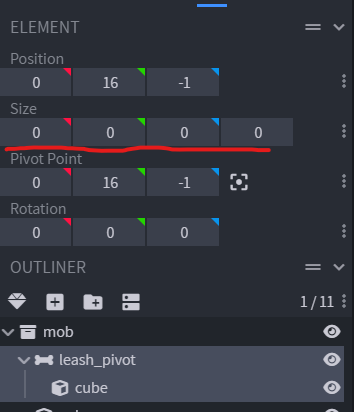
Create a new bone and call it `leash_pivot`.\
Set the `size` of the cube to `0, 0, 0`.

<figure><img src="https://517658335-files.gitbook.io/~/files/v0/b/gitbook-x-prod.appspot.com/o/spaces%2FcHqkAbmdfwmU7TFYbk0w%2Fuploads%2FMRMlVzewwgXmNFB1pYoT%2Fimage.png?alt=media&#x26;token=f6730e66-f3b8-4b58-8b27-ef58d122ac71" alt=""><figcaption></figcaption></figure>

### Step 2

Move it to where you want the leash to be attached.

<figure><img src="https://517658335-files.gitbook.io/~/files/v0/b/gitbook-x-prod.appspot.com/o/spaces%2FcHqkAbmdfwmU7TFYbk0w%2Fuploads%2FJSVlTi9C4opBZzsTWlvz%2Fimage.png?alt=media&#x26;token=7edcb9d9-6381-453a-b0a9-02de8cfe1c76" alt=""><figcaption></figcaption></figure>

Zoom and make the final adjustment to precisely place it where you want.

<figure><img src="https://517658335-files.gitbook.io/~/files/v0/b/gitbook-x-prod.appspot.com/o/spaces%2FcHqkAbmdfwmU7TFYbk0w%2Fuploads%2FUYSELRDmmBNO1gQaPcq0%2Fimage.png?alt=media&#x26;token=8f7839ac-9ce9-4e61-bea3-7a17c3415dfb" alt=""><figcaption></figcaption></figure>

### Step 3

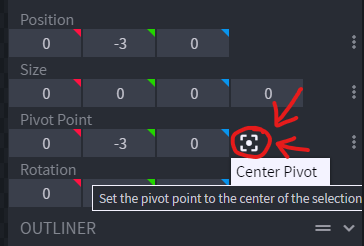
Press Center Pivot button to center the pivot.

<figure><img src="https://517658335-files.gitbook.io/~/files/v0/b/gitbook-x-prod.appspot.com/o/spaces%2FcHqkAbmdfwmU7TFYbk0w%2Fuploads%2FaJhsZCCPNxGNprzmheIe%2Fimage.png?alt=media&#x26;token=7a07362a-5731-4860-918c-90077f1c8c08" alt=""><figcaption></figcaption></figure>

### Done

<figure><img src="https://517658335-files.gitbook.io/~/files/v0/b/gitbook-x-prod.appspot.com/o/spaces%2FcHqkAbmdfwmU7TFYbk0w%2Fuploads%2FvvTqqZWwACDUWT87rGNb%2Fimage.png?alt=media&#x26;token=29b27754-c167-4081-a2ee-85cd9a62437b" alt=""><figcaption></figcaption></figure>